Thursday, October 28, 2010

200 downloads!

My tag cloud software has reached 200 downloads! I really like the download statistics offered by sourceforge; you can see how many downloads there have been, on which days downloads were made and in which countries the downloaders are. The top 5 countries for my software are:

1. United States (40 downloads)
2. Germany (19 downloads)
3. India (16 downloads)
4. Brazil (14 downloads)
5. Netherlands (12 downloads)

I haven't had any feature requests yet, but if anyone would like to see some other features; let me know!

https://sourceforge.net/projects/tagcloudmaker/

Sunday, September 5, 2010

Tag Cloud Maker 0.2 Available

There is a new version of the Tag Cloud Maker available at https://sourceforge.net/projects/tagcloudmaker/! Version 0.2 includes the following changes:

* Feature Request 3058011: Added standard/common word lists for English and
the Java and C++ programming languages.
* Relaxed minimum required JRE to 1.6.0_15 in order to test on Ubuntu.
* Bug 3056907: Asterisk in source and destination label.
* Bug 3055794: User manual incorrect.

Sunday, August 29, 2010

Tag Cloud Maker

I came across the article "JavaOne 2010: 97 Things Every Programmer Should Know" on JavaWorld the other day and there were a number of interesting topics covered in the video that goes along with the article.

One of these topics that stood out for me was "Code in the Language of the Domain". This is a valuable paradigm that allows those in the future who read your code to easily understand what the purpose of it is by writing it in such a way as to be as close to domain language as possible (see article for a full description).

In the video, two tag clouds where used to illustrate this concept. These clouds were generated from the source code of two separate programs. In the first tag cloud, the dominant words were low level programming concepts, such as "public", "integer" and "string"; not very indicative of the purpose of the program. The second tag cloud contained more domain specific terms such as "paper", "printer" and "person". This second program is much closer to the domain in which it operates (I could have a guess that it is for a printing company that fulfil print requests for clients).

This got me thinking about my own code; how obvious is it to others what my code does? Do they need to rely on the documentation all the time, or do they get the concepts based purely on my code?

I set out to create a program that would create a tag cloud from a source code base and the result is a small program called (imaginatively) Tag Cloud Maker. It is hosted on SourceForge.
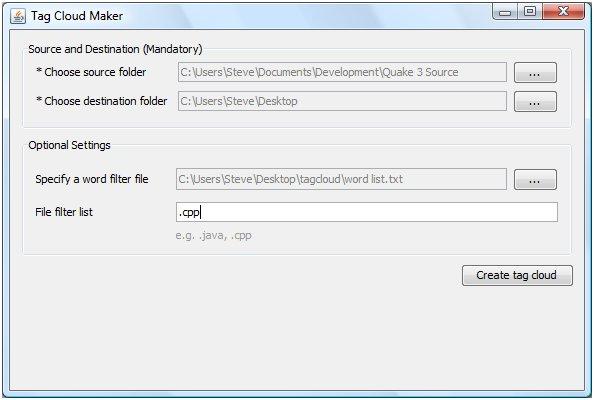


This small program will create a tag cloud from an arbitrary set of source code files and I am looking forward to seeing the results on my own code soon!

I'd be very interested to hear if anyone also finds this tool useful, after all, it does not necessarily need to be used on source code; it could just as easily produce a tag cloud from a set of Word documents or text files (such as log files) to help identify the most frequent terms and topics.

Wednesday, July 22, 2009

Setting up Subversion on Windows For Personal Projects

I have been working on my Sun Certified Java Developer assignment recently and I decided to use Subversion for source control. This gives me the ability to roll back any mistakes and reassures me that my work is safely stored somewhere (in addition to my backups).

I am using VisualSVN Server. It comes bundled with Apache and everything you need to setup the server. Once this is installed, you might want to set it to authenticate using it's own user list instead of Windows authentication (I have one account for my home pc and it isn't password protected, something which Tortoise SVN client doesn't like. Maybe your client will accept empty passwords).


Go to the VisualSVN management console. Right click on the VisualSVN Server node and choose Properties. Click on the Authentication tab and select "Use Subversion Authentication". You can then add users by right clicking on the User node and choosing "Create User...". Each user can be added to repository and thats it!

Once VisualSVN is up and running, you can install something like Tortoise SVN client and away you go!

Tuesday, June 9, 2009

Save and restore desktop layout icons position

Ever have Windows explorer crashes wipe out your icon layout on your desktop? Wish you could restore your layout with one click of a button? Then you'd better take a look at this: Saving the desktop layout in W2K (works for Windows Vista as well).

Thursday, June 4, 2009

PsTools v2.44

I have been playing with the PsExec program from PsTools v2.44. This little tool allows you to execute programs and commands on a remote system. This could be very useful if you have a build server that you want to allow developers to access in order to run a development build script. If I can just get past the "Access Denied" messages...

Thursday, May 28, 2009

Dropbox

Sometimes you come across software that is just so useful, you wonder why didn't think of it and code it already. I have that feeling with dropbox. Install it on your home machine, your machine at work, the machine at your parents house and the tool will create a special folder; your dropbox. When you put a file into the dropbox, it will be synchronised to the web and all your other machines will also receive the file. Perfect! No more emailing files to yourself from your work email to your home address, no fiddling around with USB sticks.

I've been using it since public beta and I have to say it has become an important part of toolkit. You get 2Gb of space online to fill with your files and you can shared certain folders with friends. There is even a web interface.